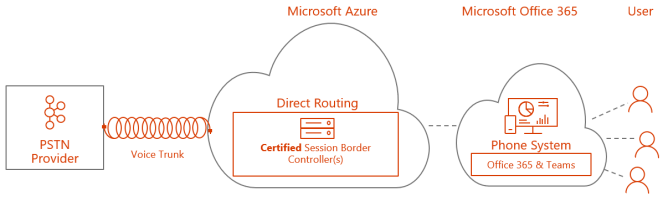
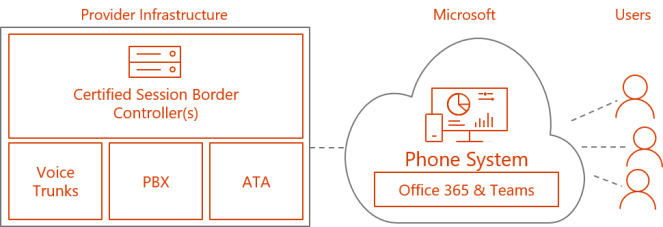
Today Microsoft Teams Direct Routing was announced as General Available. This is the means for you to bring your own SIP trunk to Microsoft Teams using only a standard SBC. Today AudioCodes and Ribbon are certified SBC’s for Direct Routing and more are in the works. There are three flavors to Direct Routing
Hosted in Azure!
Yes you read correct. AudioCodes has a certified SBC that now is supported in Azure, which means you can run your Direct Routing SBC in Azure as an appliance.
As long as the SBC is certified and supported by the vendor to run in Azure, it is implied that Microsoft will support it as well, no official Microsoft link at the moment
Installed in your datacenter connected to your PBX or SIP trunk
With Direct Routing you do not need any Skype for Business or Teams components installed in your datacenter to provide voice for your Teams users. All you need is a certified SBC, a public IP address and a public certificate to connect. Read my blogpost on infrastructure requirements for setting up Direct Routing in your datacenter
Hosted by a partner
One SBC can connect to multiple Office 365 tenants making this scenario scalable. This means you can consume native Microsoft Teams services from your own tenant and have a service provider host your voice connectivity.
Thoughts
I think Direct Routing will make Cloud Voice mainstream and it can be combined with Calling Plans where available, which means that you can freely choose how to consume voice. Being able to install the SBC in Azure means that anyone can now host and conenct their own sip trunk to Office 365. With the ability to either get this hosted or set up with next to no on-premises infrastructure you have a solution that can be consumed by most customer types from SMB to Enterprise.
Microsoft Teams Direct Routing is General Available as of June 28, 2018. This is the means for you to bring your own SIP trunk to Microsoft Teams. To be clear, this will only give your Teams users PSTN connectivity, your Skype for Business Online users still needs to use CCE or Skype for Business Server hybrid to get PSTN connectivity.
The goal of this article is to explain the basic around Direct Routing from an infrastructure point of view.
Licenses
You need a Phone System License per user, which is part of Office 365/Microsoft 365 E5 or add-on for Office 365/Microsoft 365 E3
Phone System is not available as add-on for Office 365 Business Premium or Microsoft 365 Business
To get a phone number in Teams meetings, you need the Audioconferencing license per user, which is part of E5 and can added as add-on for E3 and Business SKU’s
Firewall ports and protocols
To connect a sip trunk to Microsoft Teams, a SIP proxy is used.
From your SBC to the SIP proxy you need always to use port 5061
From SIP proxy to your SBC you can choose any port between 1024 – 65 6536
I prefer to use 5061 since it is the same port as SIP proxy and it may be simpler in the long run
Traffic needs to be open both ways
You can limit the connectivity to the pstnhub.microsoft.com addresses specified below and the IP addresses they resolve to
you should always use sip.pstnhub.microsoft.com as primary as it is a Global FQDN
sip-all.pstnhub.microsoft.com is mentioned in the documentation and can be a possible source DNS name
Media range is UDP between the ports 49 152 – 53 247
52.112.0.0 /14 (IP addresses from 52.112.0.1 to 52.115.255.254)
To connect the SBC to the Microsoft Teams SIP Proxy you need three things
Public IP, which is where the sip signaling will be routed
DNS name, which resolves the public IP
can be sbc.domain.com or more location specific, sbceu.domain.com or sbccountry.domain.com
Public certificate from one of the providers listed below
Wildcard is supported, easy to use if you have multiple sbc’s within same domain
SAN certificate is supported
Some SBC’s can only use one TLS certificate which means you need to update existing certificate with new name or make sure you add all TLS names your SBC is using
You only need one certificate per tenant, not per sipdomain, as long as the certificate contains the names of all SBC’s connected
The domain name for your connection does not need to be part of any of your sipdomains, it has nothing to do with any of your sipdomains
NAT is not supported with Direct Routing, public IP address needs to be directly assigned to the SBC
After you have prepared the FQDN and certificate and configured your SBC, you need to register it Office 365, read more here
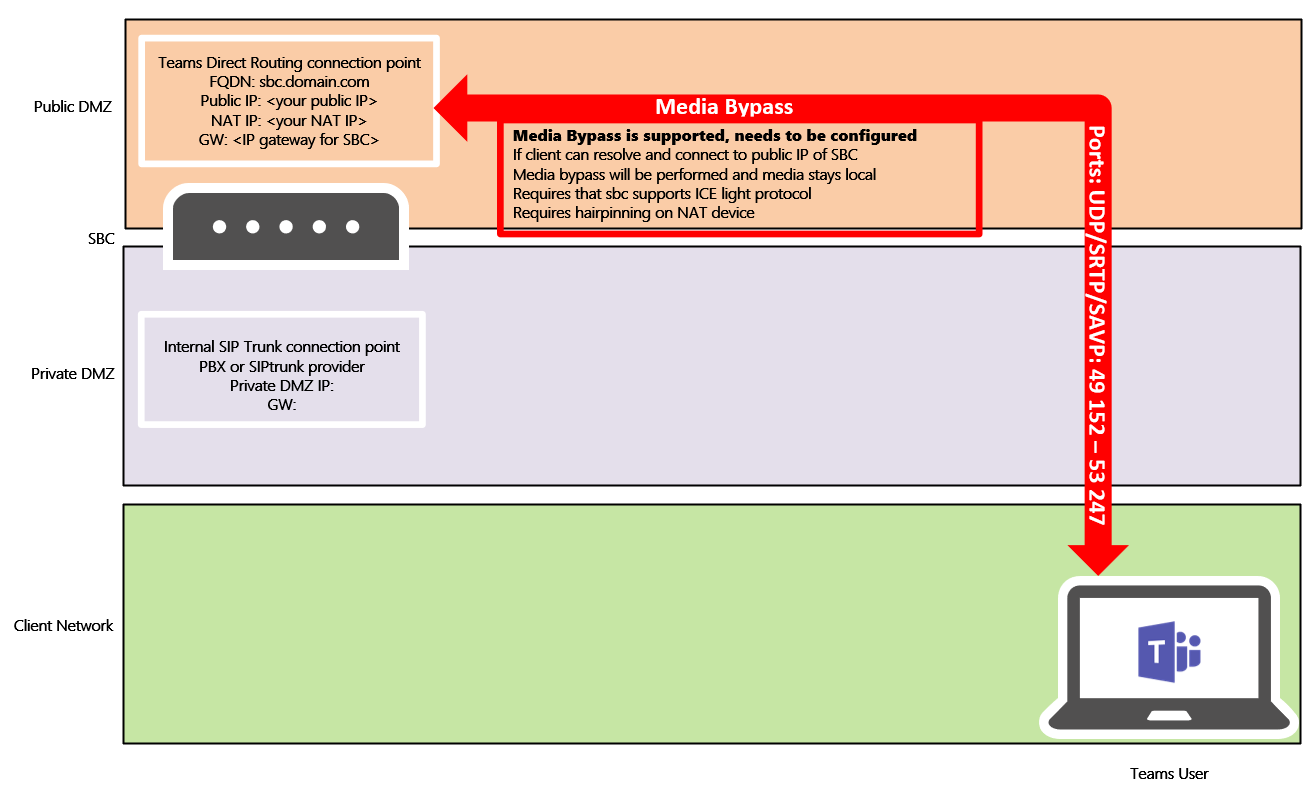
The advantage of media bypass in a Direct Routing scenario where server is in the cloud is that media stays local and the media path is more optimal
Media bypass is supported by AudioCodes and Ribbon
needs to be configured specifically on SBC and enabled in Office 365
both vendors support ICE light which is used for connectivity checks when finding optimal media path
The clients need to be able to resolve and connect the public IP of the SBC
traffic needs to be open both ways, same media ports are used
requires hair pinning on NAT device
Media Bypass externally
Media bypass is possible from clients logged on outside the corporate network
The client needs to resolve the SBC FQDN and connect to the IP
This results in allowing any IP as source ip on the media port range on the SBC
Since only TLS connections are allowed, I think this is something that can be considered
If the client cannot connect to the IP it will relay media via the SIP Proxy
Migrating to Direct Routing
Since CCE or Skype for Business Server cannot provide voice for Microsoft Teams, the only viable migration path is to introduce a SBC or configure the current SBC to connect to Microsoft Teams. From there you can start moving users by routing specific numbers and number series over to the new SIP trunk.
If you use direct SIP trunk with your Skype for Business Server today, then you can test Direct Routing by implementing a SBC and connect it to Microsoft Teams. Then provide a SIP trunk from Skype for Business using the inter trunk routing feature in Skype for Business Server, which allows you to move some test numbers to the SBC and Microsoft Teams. When you are ready to move to Microsoft Teams, you can switch the PSTN SIP trunk to go directly to the SBC.
Summary
When you have the correct approach from an infrastructure point of view, then you are ready to create PSTN usages and voice policies in Office 365. After that, users need to be enabled for enterprise voice and get assigned a number. Then you are ready to succeed with Microsoft Teams Direct Routing
References
Official Microsoft announcement on Direct Routing Preview






 msunified.net