I created a Technet Wiki called Skype for Business Survival Guide. The survival guide holds a collection of important downloads, documentation and whitepapers for Skype for Business. I hope you will join me in maintaining this wiki with new resources and community tools and activities.
I also created a simplified link for the page and a logo. Check it out, it has over 17 community made tools listed! Gotta love the Skype community :)
Sometimes working with Lync and Skype for Business I see that the services are trying to contact other servers or localhost which returns an IPv6 address. If the service is set to run only on IPv4 the service will fail and not find the listening interface since it is not listening on IPv6. In these cases I do not disable IPv6 but prefer IPv4. This needs to be done in registry and a reboot is required after the change. Do not disable IPv6 on the network card because that will not work.
Here is a simple way to do it using PowerShell
Break #In case you paste this in to PowerShell ISE and press run script:)
#Check if IPv4 IP address is preferred
ping $env:COMPUTERNAME
#If the reply is IPv6 address, run following registry setting to just prefer ipv4 and reboot
New-ItemProperty “HKLM:\SYSTEM\CurrentControlSet\Services\Tcpip6\Parameters\” -Name “DisabledComponents” -Value 0x20 -PropertyType “DWord”
#If DisabledComponents exists, use the set cmdlet
Set-ItemProperty “HKLM:\SYSTEM\CurrentControlSet\Services\Tcpip6\Parameters\” -Name “DisabledComponents” -Value 0x20
#You need to reboot the computer in order for the changes to take effect
Restart-Computer
Check the values below for other options
Type 0 to re-enable all IPv6 components (Windows default setting).
Type 0xff to disable all IPv6 components except the IPv6 loopback interface. This value also configures Windows to prefer using IPv4 over IPv6 by changing entries in the prefix policy table. For more information, see Source and destination address selection.
Type 0x20 to prefer IPv4 over IPv6 by changing entries in the prefix policy table.
Type 0x10 to disable IPv6 on all nontunnel interfaces (both LAN and Point-to-Point Protocol [PPP] interfaces).
Type 0x01 to disable IPv6 on all tunnel interfaces. These include Intra-Site Automatic Tunnel Addressing Protocol (ISATAP), 6to4, and Teredo.
Type 0x11 to disable all IPv6 interfaces except for the IPv6 loopback interface.
I am really proud to be awarded Microsoft Most Valuable Professional (MVP) 2016. This is the sixth time I receive this award and it is a real honor to be part of this community and that Microsoft recognizes my contributions. This time I have been awarded as Office Servers and Services MVP.
The change in the name from Skype for business to a more generic title signifies the change within Microsoft and the move to a more cloud and integrated platform across products. For me this works well since I now work more with the Microsoft platform on-premises, in hybrid and in the cloud and help customers succeed with productivity in general.
I did a talk at Nordic Infrastructure Conference this February where I talked about how to succeed with productivity in Office 365 and EMS in a level 200 session, where Skype for Business is an important component for real-time collaboration. Check out the recording below
Being an MVP helps me stay current on the technology, have a great network to sync my ideas with and learn directly from Microsoft at the MVP Summit. Next up is that I am speaking at the Belgium E-Communications event April 26
On March 30, 2016 I am presenting at an Enterprise Connect webinar about Skype for Business and overcoming telephony migration challenges. I see that the challenge of doing phone numbers right are real both in larger Skype for Business environments and global mixed environments. I am looking forward to discussing the challenges with industry expert Kevin Kieller and the Unimax team on March 30. Make sure you register here
Topic
More and more organizations are complementing or replacing their legacy telecom and UC systems with Skype for Business. The challenge is phone number management in a mixed environment or in a Skype for Business only environment. For the past five years I have been working on phone number management within Lync and Skype for Business resulting in the latest iteration of my PowerShell script. I have also talked at Microsoft events such as Lync Conference, TechEd North America and Microsoft Ignite about the challenges and I see a real interest in the market on how to do number management effectively.
I had the great honour to talk about Skype for Business and the new voice features this year at Nordic Infrastructure Conference 2016 in Oslo Spectrum. The event seemed like a great success and I look forward to next year.
Abstract: Microsoft has released the Cloud PBX, PSTN conferencing and PSTN calling readily available in Office 365. This session looks at what it means, how to configure it and how to succeed with it including automating number administration.
Acano is one of the providers out there that closes the gap between video conferencing endpoints and Skype for Business that includes featuers such as integration with the Skype for Business meeting invite and enables application sharing accross platforms.
Acano has made available a REST api to configure Acano deployments further than just setting it up with the default configuration. My colleague Tom-Inge Larsen has made a PowerShell module so that you can use PowerShell to work with Acano deployments. This is great stuff! Now I can use my existing skill set coming from a Microsoft background to tune the Acano deployments I work with. In this example I want to change the branding of the meeting you are joining with custom welcome screen for SIP and Skype for Business clients
At the time of writing there are 161 cmdlets available
You will find that the name of the cmdlets matches the names from the API so you can look up the properties and what you need to set in order to configure this
Now you are done! You have now created a global Call Branding Profile
You can also create a call branding profile and assign it at the tenant level or at the coSpace level
You only need to create one callbranding profile per cluster, since all servers in the cluster will share the same configuration
In order for this to work, make sure the license allows for customization, not all licenses from Acano allows for customization. Make sure it is assigned to all servers in the deployment
Update: Check out the Pomodoro Windows App that makes it easier to set custom presence states
I love custom presence states. Being able to tell my peers what exactly I am doing is something I find valuable. You can be busy in so many ways, during workshops being available for short chats, but not phone calls. During Pomodoro sprints where I want to be unavailable, but tell everyone that I am focusing so please don’t call me.
I wanted to set this in my Skype for Business installed through Office 2016. Turns out that the registry settings has changed and the new path is
I have updated my script at Technet Gallery to set custom presence state registry settings for Office 2013 and Office 2016. Check out my latest blogpost on how to use it here
The Microsoft Call Quality Methodology (CQM) is a systematical approach to not only troubleshoot and fix problems in your Lync and Skype for Business infrastructure, but also establish a methodology that is used proactively maintain call quality over time in your deployment.
The information highlighted by CQM is generated from the lcsCDR and lcsQoE databases and is real actionable content when looking for call quality issues and performance.
Check out my video on why you should implement CQM in your deployment
CQM summed up in five bullet points
Server performance is the first thing you should look at using Key Health Indicators (KHI) collected over 14 days
New in the june 1 update is that you now can automatically import the counters in to an excel spreadsheet to get max and average values with thresholds
Sorting on the Burst Frequency for Sub-Optmial counters does a great job on highlighting underperfoming counters
The AudioMicGlitchRate helps to highlight endpoints that have performance issues even though they are using the correct hardware.
The Rate my Call feature introduced in Skype for Business is highlighted in the CQM report
This is great for getting actual feedback from users on how they experienced the call
The Call Quality Dashoard (CQD) introduced in Skype for Business Server highlights media stream quality and media paths in realtime
CQM is not something you do once, but a systematical approach over the entire lifespan of your deployment where you focus on
creating a baseline
prioritizing the most obvious and easiest fix first
fix one issue at a time and retest
maintain the solution over time as the deployment evolves
May 2015 I had the honor to talk at Microsoft Ignite in Chicago. That was great fun and 300 showed up at my session about how to save time by automating phone number management in Skype for Business Server. Before this talk I released a new scritp called Get-SfBNumbers.ps1 which you can download and find more information about at http://SfBNumbers.net. Look for more Enterprise Voice tips and scripts at that site, and I will in time blog about examples for how to use the script.
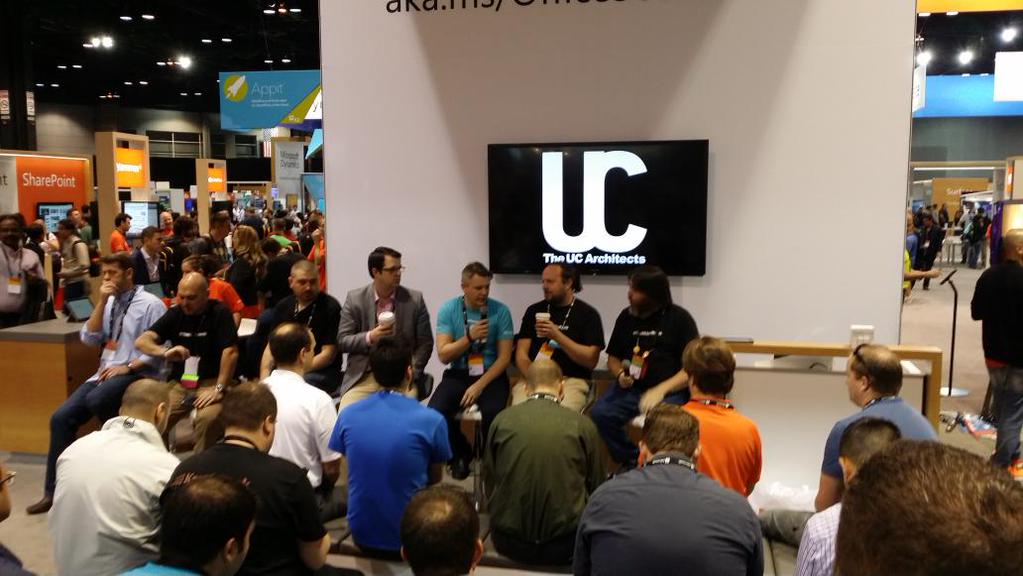
I had a great time attending Microsoft Ignite, lots of networking and I got to attend some great sessions with interesting content. We also did a live recording of The UC Architects podcast with Jamie Stark joining us. Check out some images at the bottom of this blogpost
 Sometimes working with Lync and Skype for Business I see that the services are trying to contact other servers or localhost which returns an IPv6 address. If the service is set to run only on IPv4 the service will fail and not find the listening interface since it is not listening on IPv6. In these cases I do not disable IPv6 but prefer IPv4. This needs to be done in registry and a reboot is required after the change. Do not disable IPv6 on the network card because that will not work.


 Acano is one of the providers out there that closes the gap between video conferencing endpoints and Skype for Business that includes featuers such as integration with the Skype for Business meeting invite and enables application sharing accross platforms.
 Update: Check out the




 msunified.net