Featured on NextHop blog Series: Interview with a Lync Pro

I had the honour of being interviewed by Justin Morris who writes the blog series Interview with a Lync Pro hosted at the Lync NextHop blog. It is really cool be featured in such a way and recognized as a Lync Pro by the community together with the people I myself turn to for expert knowledge. Head over to NextHop to read the entire interview and also make sure to read the interview of the other Lync Pro’s as well: http://blogs.technet.com/b/nexthop/archive/2012/03/23/interview-with-a-lync-pro-st-229-le-hansen.aspx

NextHop is the Microsoft Lync Server team’s customer response channel—a new medium to rapidly make the information you need available to you, when you need it. NextHop provides pertinent, short-format, technical articles between major releases of the product and associated product documentation (technical library content, Resource Kit book, whitepapers, and tools).
NextHop highlights the knowledge of experts in the Lync Server community, bringing you information from internal and external experts, such as the Lync Server engineering team and our Most Valuable Professional (MVP) community. In addition to publishing great content by contributing authors, NextHop keeps a pulse on the community. The Lync Server Blog Roll and @DrRez Twitter feed highlight the activities of other sites and blogs focused on Communications Server. NextHop provides pointers to a wealth of information about Lync Server. Our plan is to support, encourage, and evangelize all the great content that is being written about Lync Server.

Virtual Technical Solution Professional (V-TSP) at Microsoft Norway

In january 2012 I became a Virtual Technical Solution Professional (V-TSP) at Microsoft Norway. Virtual means that I am still employed by Atea but work closely with the local Microsoft team.
My role as a V-TSP is to provide technology overviews, proofs-of-concept, technical demonstrations, and technology assessments for Microsoft customers. The V-TSP program demands that the partner have the gold competency and that the provided resource is highly skilled and certified within the area of expertise.

I am really looking forward to work even more closely with Microsoft and make sure their customers implement Microsoft Lync and the Unfied Communications proftfolio to the fullest by combining the broad best-of-breed UC technologies from Atea together with Microsoft.

Here is some information I found regarding the V-TSP program

The Microsoft Virtual Technology Specialist Program (V-TSP) is a select group chosen from the elite in Microsoft’s partner community, whose focus is to augment Microsoft’s internal Technology Specialist team. Their primary role is to communicate the value of Microsoft Solutions to customers and to provide architectural guidance for Enterprise Integration solutions. The Microsoft V-TSP program was designed to create a deeper relationship with Microsoft Partners, the Product Teams at Microsoft Corporate, and Regional Microsoft Offices, in order to provide highly skilled solution specialists to Microsoft customers. It is designed to enable a high performance team of partner-based resources to deliver pre-sale activities and resources to empower customers and help them meet their solution and integration needs.

V-TSPs are chosen by Microsoft because of their superior architectural, development, consulting, and customer interfacing skills. Microsoft utilizes these type of individuals in partnership with the Microsoft regional Offices, in pre-sales efforts to secure Microsoft solution opportunities. This includes meeting with Microsoft customers, participating in customer visits with Microsoft representatives, as well as, participating in broad reach events like presenting training and seminars to Microsoft customers.

Microsoft V-TSPs have direct access to online resources and documentation and resources that are usually solely reserved for the Microsoft internal teams. They also have early access to extensive information about all new Microsoft product releases, which benefit Atea and Microsoft customers.

Script to reset user policies in Lync on migrated OCS users

A while back I was migrating a pilot OCS 2007 R2 solution to a Lync production solution. After moving the users I found that they had inherited their policies regarding external access and voice from OCS. In this case I was utilizing global policies in Lync and removing the need for granting specific policies to the users.

To change this I created a simple little script to reset these policies. The script is used at your own risk.

Download it here: https://msunified.net/lyncdownloads/script-reset-userpolicies-ps1/

The Script Does the Following

  • Gets all users that have an external policy set to other than $null
  • For each user all policies are set to $null
  • Writes the users who are changed, can be exported to csv if wanted
  • Also checks if any users failed and prints their names

If you can’t change settings on some users it is probably because of permission issues on the user object in AD. To check if that is the case do the following:

  • Open Active Directory Users and Computers (dsa.msc) from the Lync Front End server or any other server with ADDS
  • Go to View and select Advanced Features

  • Now find the user with the permission issues and select Properties
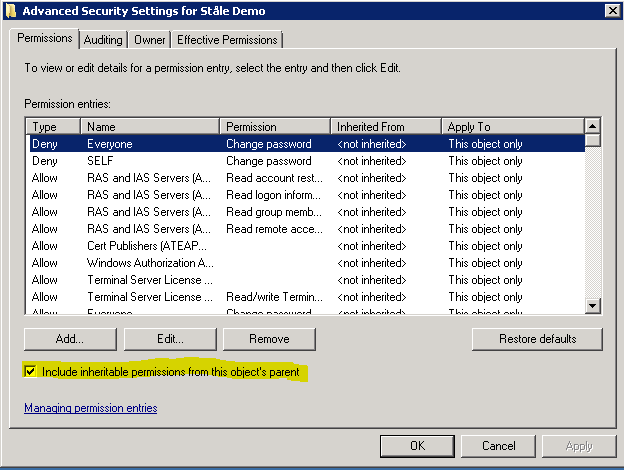
  • Select the security pane and click on Advanced
  • Make sure that “include inheritable permissions from this object’s parents” are checked

  • If not check it and OK out of there
  • Wait for AD replication and try again

This is an old Exchange AvtiveSync and OWA issue where users could not access these features. The affected users where probably a member of the below groups or have been at some point.

Found a good description of what can make this occur at: http://alanhardisty.wordpress.com/2010/03/05/activesync-not-working-on-exchange-2010-when-inherit-permissions-not-set/

The reason this happens is because Active Directory uses something called the AdminSDHolder to define what permissions the default protected security groups receive. Whilst you can change the inherited permissions, a process called SDPROP will run, by default every 60 minutes on the domain controller that holds the PDCe role. It will check the ACL of the protected groups and reset their inherited permissions and the users within the groups, with what has been defined by the AdminSDHolder object.

Microsoft’s recommendation and best practice is that if you are a domain administrator that you have 2 accounts. One for your everyday user which is restricted in the same way that every other user is and a second for your administration role.

The built in groups that are affected with Windows 2008 are:
Account Operators
Administrators
Backup Operators
Domain Admins
Domain Controllers
Enterprise Admins
Print Operators
Read-only Domain Controllers
Replicator
Schema Admins
Server Operators

The built in users that are affected with Windows 2008 are:
Administrator
Krbtgt

Awarded Lync Microsoft Most Valuable Professional (MVP)


Today was a good day! I received an email from Microsoft presenting me with the 2011 Microsoft® Lync MVP Award for the first time. The mail stated: “This award is given to exceptional technical community leaders who actively share their high quality, real world expertise with others. We appreciate your outstanding contributions in Lync technical communities during the past year”. I am proud to be a Lync MVP and want to thank the people within Microsoft who nominated me and the community who share the same passion for technology. It is a good feeling to get recognition for the hard work and dedication you put in to your work and your hobby. I look forward to interact within the Lync MVP community.

View my MVP profile page here: https://mvp.support.microsoft.com/profile/Hansen1

Today there is 42 Lync MVPs and I am one of them. There where 140 new MVP awards and 814 MVPs that were re-awarded world-wide within the whole range of Microsoft technologies. Read more about it here: http://blogs.msdn.com/b/mvpawardprogram/archive/2011/03/28/congratulations-to-the-new-and-re-awarded-mvps.aspx

What is the MVP Award?

The Microsoft MVP Award recognizes exceptional technical community leaders from around the world who voluntarily share their high quality, real world expertise with others. Microsoft MVPs are a highly select group of experts representing technology’s best and brightest who share a deep commitment to community and a willingness to help others. Worldwide, there are over 100 million participants in technical communities; of these participants, there are fewer than 4,000 active Microsoft MVPs.

Read more about it here: http://mvp.support.microsoft.com/

A short video about whats cool about being an MVP

Lync Server Front End: Lost connection to the Web Conferencing Edge Server

I have seen this problem in a couple of deployments now and have decided to share this information since there is not much about it on the web.

The problem

Event ID 41024 – Lost connection to all Web Conferencing Edge Services
Event ID 41024 – Lost connection to the Web Conferencing Edge Server
Event ID 41025 – Connection to the Web Conferencing Edge Server has been restored

These Event ID’s appears every five minutes on the Lync Front End Server, but not in all implementations. I don’t know why it is in only some implementations.

The Resolution

Disable IPv6 on the Front End server. When implementing Exchange 2007 and 2010 we often came across a similar problem where the resolution was to disable IPv6. Disabling IPv6 has cleared the Event ID errors in the cases I have seen. To disable IPv6 properly don’t just uncheck IPv6 on the network adapter, but do it in registry and reboot. See this KB article for how to disable IPv6 properly: http://support.microsoft.com/kb/929852

Screens of the exact Event ID’s


Lync Server 2010 features and how to configure them

UPDATE: This blog post has moved to the TechNet Wiki for open editing: http://social.technet.microsoft.com/wiki/contents/articles/10119.wiki-lync-server-2010-features-and-how-to-configure-them.aspx

Now that Lync has gone RTM and Virtual Launch is done we need to get down to business and deploy Lync to the general masses. During the time of Beta, RC and early RTM a lot of great blog articles were published about features and how to configure them. I wanted to collect the posts I find interesting here so I have them all in one place when I deploy Lync Server to my customers. I will update this article with new posts as I find them or when they get published.

Last updated: 16.10.2011