Speaking at Lync Conference 2014 about Phone Number Management in Lync Server 2013

I’m happy to announce that I will be speaking at the Lync Conference 2014 in Las Vegas 18-20 February. The topic is Phone Number Management in Lync Server 2013 and I will share my experience from the many Lync Enterprise Voice projects I have been involved in, both for Norwegian and global companies. The session will be level 400 (technical session) starting with an in-depth insight into how to manage Phone Numbers, then a walkthrough on how you can use Get-UnusedNumbers PowerShell script that I have developed and look at other tools that you can benefit from in your administration workflows.

There is one thing to deploy numbers for users, but there is a whole other process needed for maintaining available numbers in a day-to-day administration process. This will be the main focus for the this session. So if you want learn more about Phone Number Management in Lync Server 2013 I hope to see you in Vegas.

lyncconf

lyncconftalk

Level: 400
Url: http://www.lyncconf.com/SessionDetail.aspx?id=9438
Abstract: Ståle Hansen, the creator of Get-UnusedNumbers PowerShell script, walks through how phone number management is done throughout different Lync deployments. The session will start with some of the basics and will quickly move over to more advanced scripting and tools that can be utilized in user creation workflows and user management scenarios. Be sure to attend this session if you want tips on phone number management in your environment or customer deployments.

I want your input on the subject

The goal for the session is to give the audience the best view, and the most complete, overview on how to handle phone numbers in a Microsoft Lync 2013 environment.

I want to hear from the community how you handle phone numbers in your Lync environment, in your organization and/or in your customer’s deployments. Is it through Excel spreadsheets, manually, PowerShell scripts? I would love to use your feedback to improve the session. Please reply to this post, contact me directly or send me a tweet about how you resolve this scenario. I hope for good response and thank you in advance :)

Speaking at Nordic Infrastructure Conference january 2014

For the third time I have been invited to speak at the Nordic Infrastructure Conference in Oslo january 2014. It is a huge honor to speak at such a premiere event with keynote by Andy Malone and speakers that are known for their technical knowledge and being good techtalkers. This year the focus is cloud and I will talk about Lync 2013 video interoperability and Lync Exchange integrations scenarios.

nicCE

Fellow Lync MVP Justin Morris will also be presenting Lync sessions on rollout success factors and how Lync Server 2013 leverages the complete Microsoft infrastructure ecosystem.

Here’s the two sessions I’ll be delivering:

Understand how video works in Lync and how video interoperability can be utilized Lync 2013 introduced a new video codec, multiview and mobile clients that can do video. This session talks about how it works, Lync Room System and how you can use third party solutions to interact with all other video solution out there.

Understand how Lync integrates with Exchange The Microsoft Exchange integration is core functionality in Lync. This session will go through how the different clients access exchange calendar information and we will take a look at UCS, High-res photos, Lync in OWA and Exchange Unified Messaging as well as take a look at how Lync on-premises can integrate with Exchange Online

NIC Cloud Edition is on January 16th-17th at Oslo Spektrum and offers not just UC topics but sessions on System Management, Virtualisation, Cloud Services, client management and loads more. For more info check out the agenda here.

Lock down your Lync status and PC notifications using PowerShell

PomodoroRecently I wrote a blogpost on Control your Lync presence during a Pomodoro Sprint using PowerShell. This awesome script uses a timer and the Lync SDK to lock down Lync for 25 minutes while I get some real work done. The only thing I did not find out was how to suppress is Outlook popups and other notifications.

Thanks to a great tip by MVP Olav Tvedt i found out that you can set your laptop in presentation mode using the commandline tool presentationsettings

  • PresentationSettings /start
  • PresentationSettings /stop
  • Works from PowerShell as well

Using the script on a desktop

Apparently PresentationSettings is not installed on desktop computers by default. Searching the net I found a post by MVP Robert Sparnaaij where he described that you can use registry to enable this feature on desktop computers as well: http://www.msoutlook.info/question/380

If you save the below text to a .reg file and run it you will add the settings necessary to enable PresentationSettings and you are good to go

Windows Registry Editor Version 5.00

[HKEY_CURRENT_USER\Software\Microsoft\MobilePC\MobilityCenter]
"RunOnDesktop"=dword:1

[HKEY_CURRENT_USER\Software\Microsoft\MobilePC\AdaptableSettings]
"SkipBatteryCheck"=dword:1

; WARNING: Using Registry Editor incorrectly can cause serious problems that may require you to reinstall Windows. Microsoft cannot guarantee that problems resulting from the incorrect use of Registry Editor can be solved. Use Registry Editor at your own risk.

Download the script and check out how I use the Pomodoro Technique with Lync and PowerShell here: https://msunified.net/2017/08/23/set-yourself-unavailable-with-this-open-source-powershell-based-pomodoro-timer/

Control your Lync presence during a Pomodoro Sprint using PowerShell

This article is for you Lync-PRO’s out there who want to differentiate yourself from the average Lync user and at the same time want to reach true flow state using the Pomodoro Technique

This article discusses

  • The Pomodoro Technique
  • Flow state by Jason Silva
  • My Lync controlling Pomodoro PowerShell Script
  • The Script

Continue reading

MUCUGN: Slides and recording available Lync and Exchange integrations

Microsoft UC User Group Norway (MUCUGN) had its first meeting over Lync 2013 june 19 2013. We where about 26 participants, which is great for the first meeting and the topic was Lync 2013 and Exchange 2013 integrations with demo. We recorded the session and the slide deck (in english) and the Lync recording (in Norwegian) are now available.

Remember to join us for our next meetup at september 17 where Lasse Nordvik Wedø will talk about Centralized Logging Service : http://www.meetup.com/MUCUGN/events/137807372/

Topic: Integrating Lync Server 2013 and Exchange Server 2013

  • Prerequisites
  • Unified Contact Store (UCS)
  • High Resolution Photos
  • Online meeting in OWA
  • OWA IM integration
  • Exchange UM
  • Demos

Thanks to Jens Trier Rasmussen [MSFT] for letting me use his awesome deck :)

View and download slides from SlideShare

slide1

View the Lync recording from Vimeo, it starts at about 3.50 :)

Book Review: Getting Started with Microsoft Lync Server 2013

CatturaI was asked by PACKT Publishing to review a new Lync 2013 book authored by Fabrizio Volpe called Getting Started with Microsoft Lync Server 2013. I have never done a book review before and figured it was a good start doing a review on a getting started book :)

About the book

The book was written by Fabrizio Volpe and was published July 2013. Going to the official landing site you will find that it is available both in print and as an e-book and sports 122 pages. You will also find the following overview

  • Understand and deliver the top required features such as Enterprise Voice, Persistent Chat, and mobility with step-by-step guides
  • Deploy a working environment applying load balancing and fault tolerant solutions
  • Create a collaborative space around the user’s needs, containing all the information and document history using the Persistent Chat Server

The book is aimed at system administrators, IT pros, unified communication technicians, and decision makers in companies or in the consultancy business.

My thoughts on the book

I found the book very accessible. It tells you how to implement Lync and at the same time goes through

  • Best Practice configuration
  • core technology without going to deep
    • will refer you to TechNet or good blog posts on the subject if you are interested in learning more
  • the steps for installing Lync in the correct order without too much jumping back and forth

It is fast paced, straight to the point in installing the core features and it is easy to follow throughout. I reads like a well written blog post series, and I like it since I tend to find to the point blog posts more accessible than the more thorough and sometimes vague TechNet type articles.

My recommendation

I would recommend this book to an IT-administrator or someone tasked with getting to know Lync and who wants to implement it in a lab and do it correct the first time. It is as it says in the title, a good starting point in to the world of Lync 2013 core technology. I would say it is not so much for Lync professionals or decision makers since it will not go deep enough in to the technology or discuss Lync as a state of the art Unified Communications experience in detail.

I did not make any money doing this review, I only got access to the e-book for a read-through in order to write the review.

Gartner Magic Quadrant for Unified Communications 2013

Is that time of the year again when Gartner releases their yearly analysis of the Unified Communications vendors and their offerings called Magic Quadrant for Unified Communications. The vendors evaluated must meet certain criteria which is a product portfolio that supports

  • Voice and telephony
  • Conferencing
  • Messaging
  • Presence and IM
  • Support for different client platforms
  • Support communications-enabled Applications

It is a tradition to comment on the Gartner UC MQ’s here at the msunified.net blog, and have done so since 2009. See the previous articles here:

Lync client sign-in and DNS records recommendations

This article was last updated 23.12.14

The Lync 2013 clients uses lyncdiscover to find the pools and url’s they need to sign in to. I have spent a couple of days trying to figure out the most restrictive way to DNS records where all clients work and here is my recommendation regarding internal DNS records and where the clients should sign in from. I will start with the conclusion, and then continue with some background information and finish with some test results. This article does not talk much about external DNS records since they are the same as for Lync 2010, mostly. Continue reading

Announcing Microsoft UC User Group Norway (MUCUGN)

I am pleased to announce that I am part of starting up a virtual Lync and Exchange User Group for the norwegian UC enthusiasts. The name of the group is Microsoft UC User Group Norway (MUCUGN).

About MUCUGN

  • The group is virtual and it will initially be hosted solely on Lync so you can join from wherever you are in Norway
  • The group is available for all UC enthusiasts
    • Focus of the presentation will be technical as well as end user features
    • We will do a topic poll before each event
  • The first event will feature a joint Lync and Event topic
    • After that we split in Lync only and Exchange only events
  • Event interval will be about one and a half month

The first event

The first event will be held the 19th of june 2030. If you are interested sign up here: http://www.meetup.com/MUCUGN/

Topic for the first event: Lync and Exchange integrations with demo

  • In the 2013 timeframe Lync and Exchange are better together. This session will dive in to how they integrate, what features you can expect and show the features in a live demo
  • Speaker: MVP Ståle Hansen 

Troubleshooting Office Web Apps Server for Lync

Recently I had to troubleshoot Office Web Apps Server deployments at a couple of customer sites. I had to work through the config and sometimes the Office Web Apps server feels disconnected from the rest of the Lync configuration and can be a difficult role to troubleshoot. I have tried to collect my notes and if I have missed something, let me know.

How to check that the Office Web App Server Web farm is deployed correct

How to check that Lync detects the Office Web Apps Server correct

  • Look for Evnet ID 41034
    • Web Conferencing Server has successfully discovered Office Web Apps Server, PowerPoint content is enabled
  • Look for Event ID 41032
    • Will show that it found the URL’s correct
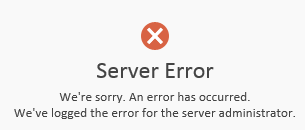
    • Clicking on the internal URL should result is a server error message like in this picture
  • To force rediscovery of the URL’s restart the RTCDATAMCU service
    • Run Get-CsWindowsService RTCDATAMCU to see if there is any active conferences
    • Then stop and start the service
    • Look for Event ID 41032
  • Make sure that the Topology Builder is provisioned with the correct Office Web Apps Farm
    • Event ID 41033 is logged if the Lync server is unable to resolve the Office Web Apps Farm

On a side note, you may want to lock down your Office Web Apps Farm so that others can not use it. Read more in this post by MCM Marjus Sirvinsks: http://marjuss.wordpress.com/2013/05/03/basic-security-better-than-no-security-limit-access-to-office-web-apps-server/