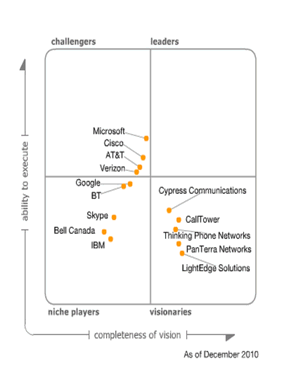
Gartner Magic Quadrant for Unified Communications as a Service 2010

Gartner released their Magic Quadrant for Unified Communications as a Service (UCaaS) 2010 december 2010. This is the second time they release a MQ for this segment. They say it is a market that is in a maturity phase and will continue to change in the coming years. No participants are in the Leaders quadrant this year.

UCaaS is a cloud-based delivery of integrated communications capabilities spanning voice, messaging, conferencing and presence. Businesses should view UCaaS as an emerging alternative to premises-based UC platforms for improving productivity, processes and workflow.

Microsoft is a challenger with its BPOS offering. With Office 365 maybe they can become a leader in the UCasS market as they can offer Lync Online and Office Online in addition to Exchange and Sharepoint. Some of the major improvements in Lync Online is

  • Federation is now possible allowing collaboration with federated contacts
  • Combine Lync Online with On-Premise deployment as you can with Exchange 2010
  • Access to the Lync 2010 client is a benefit in it self

Read the full report here: http://www.gartner.com/technology/media-products/reprints/microsoft/vol14/article13/article13.html

Gartner Magic Quadrant for Unified Communications 2010

[tweetmeme source=”stalehansen” only_single=false]Gartner updated their magic quadrant for Unified Communications July 2010. It is always interesting to see what Gartner has to say about the UC market. It is good to see that Microsoft still is in the lead followed closely by Cisco and Avaya. As we can se from 2009 to 2010 is that Microsoft is still in the lead while IBM has been reduced to a challenger. Cisco and Avaya has gotten a clearer UC message and are following Microsoft closely. I often use this in presentations at seminars to explain some of the reason why we promote Microsoft as the UC vendor of choice.

Here is what Gartner has to say about Microsoft in their article

Microsoft

Microsoft’s UC solution is based on Exchange Server, OCS and Active Directory. Microsoft has strategic partnerships with Aspect and HP, along with a large and growing set of partnerships for gateways, survivable branch appliances, IP phones, audioconferencing service providers and SIP trunking, along with major system integrators and channel partners. OCS also integrates with collaboration and business applications like SharePoint. The same OCS and Exchange application is also used for Microsoft’s online collaboration suite, Business Productivity Online Standard Suite (BPOS).

Strengths
  • Microsoft OCS 2010 R2 has seen year-over-year increased adoption for voice and audioconferencing, and now states that it has 100-plus deployments of over 2,000 telephony users. The next release of OCS, Microsoft Communication Server “14,” scheduled for this calendar year, will add several critical telephony functions.
  • Exchange UM continues to gain acceptance and maturity in the market. Deployments have expanded beyond smaller (fewer than 2,000 subscribers) into the midsize (2,000 to 5,000 subscribers), with a few deployments in the very large (10,000-plus subscribers) market. In Exchange Server 2010, calendar access is integrated with the UM telephone interface, as is text-to-speech rendering of audio messages.
  • Microsoft’s historic strength in collaboration and desktops, combined with promising, emerging real-time communications, results in significant potential. Emerging areas include increased visibility of SIP trunks from carriers and from IP-PBX providers, significant new end-to-end UC solution providers, such as HP, and increased presence in contact centers.
  • Enterprises looking into UC, particularly those with Microsoft applications already in place, should understand Microsoft’s broad UCC paradigm. When considering telephony specifically, OCS can be deployed in different configurations, depending on enterprise directions and requirements. It can be deployed with a PBX so that both are in parallel use for telephony, or it can be deployed to perform nontelephony functions, leaving telephony to the IP-PBX. As OCS matures in 2011, OCS may be able to perform complete stand-alone telephony services.


Cautions

  • The telephony functionality in OCS 2007 R2 remains in the early stage, and OCS has not yet been proved as a complete telephony displacement. Enterprise planners should understand that OCS 2007 R2 has limitations, and should carefully evaluate some critical newer features in the forthcoming version of OCS, such as call admission control and E911.
  • Microsoft’s OCS audioconferencing and videoconferencing product set has expanded its interoperability and endpoint support abilities this year, but these functions remain new and have not yet been proved in the market.
  • Many OCS communication functions, such as telephony, video and public switched telephone network (PSTN) integration, require solution integrators and employees with different skills than many firms presently have. Planners should ensure that their providers and internal staff have relevant experience in key areas.
  • Currently, OCS offers an attractive initial price point for bundled communications and collaboration; however, voice capabilities will be priced separately in subsequent releases. Although some users will be allowed grandfathered pricing, others may see the competitive price advantage of the OCS bundle disappear.

Link to the full article: http://www.gartner.com/technology/media-products/reprints/microsoft/vol10/article19/article19.html

New trojan on MSN March 2010

[tweetmeme source=”stalehansen” only_single=false] March first 2010 Telenor TSOC discovered that a new worm was on the loose on Windows Live Messenger. This time it is in your native language and therefor the probability of users actually clicking on the link is much greater. The worm sends a link from one of your contacts in MSN and if you click it a trojan will be downloaded to your PC and install itself. This is a huge risk for businesses that allow users to use Windows Live Messenger in their company network. If one PC get compromised in the internal network the possibility for it infecting other PC’s is even greater. This is one of the main reasons to implement OCS 2007 R2 as the only business solution for chat. Some arguments are:

  • Encrypted internal chat solution
  • All traffic stay inside you organization
  • Can federate and chat with other organizations in a secure manner
  • Can add global rules for blocking links, file transfers and unpatched clients
  • Can add MSN contacts and be sure that messages with links is blocked server-side

In addition to secure chat OCS gives the businesses the ability to implement Unified Communications and is therefore way more than just a chat client.

About this trojan

First you get a message from one of you contacts saying, seen this?? :D  and it links to hxxp://www.facebook-c.com/image.php?Photo023girl.JPG. The trojan adapts to the language on the computer and will display the text in you native language. In norwegian it will be se på dette bildet :D with the link following. The link points to a site at Yahoo and so the links was live for a day or two. It still was a huge security risk. The trojan is written in Visual Basic and executes a C++ program. It installed itself as c:\windows\winmbu.exe and granted itself access through the local firewall. The program gave the owner of the trojan access to

  • Communication with C&C over the IRC protocol
  • Sending of messages over MSN and Yahoo messenger
  • Download and run files on the infected computer

At release date only 13 of 41 antivirus products detected this file. So even with an updated antivirus on the local computer 69% of the antivirus solutions would not have detected it.

Link to official article in norwegian: http://telenorsoc.blogspot.com/2010/03/trojaner-spres-via-msn-messenger.html
Link to the antivirus protection overview: http://www.virustotal.com/analisis/89c677bc0044864d80244aee8201661e79f431f33c3b164aa778f363fe1cf9da-1267474859

Official Microsoft OCS Reference

[tweetmeme source=”stalehansen” only_single=false]I am pleaced to announce that a OCS solution I designed and deployed is featured as an Official Microsoft Reference. It is an Enterprise Voice solution based on SIP-Trunk and delivers voice to 12 locations. We competed against a phone solution purely based on mobile phones with a netcentric call center solution. The customer wanted single number reach using the mobile phone as the only number and simple management.

With OCS we could deliver:

  • PSTN delivered over SIP-Trunk using Telenor as vendor
  • Mobile phone number as the only number shown when dialing from OCS
  • Dual Fork when calling the mobile number
  • Presence status delivered from mobile phone network directly integrated with OCS, without the use of the Communicator client
  • Dial-in Conferencing
  • Response Groups
  • Attendant Console

The bonus was the full Unified Communications solution that was delivered with OCS, wich the other solution did not have, with presence, chat, video and collaboration across multiple locations.

The customer was very pleased with the solution and it works as intended. The article is in norwegian, but one thing to note is that the customer appreciate  the simplicity of administering OCS as a telephony solution vs a regular PBX because it’s Microsoft, it’s based on AD and they can manage and update it themselves.

Check out the Official Microsoft Reference here: http://www.microsoft.no/msno/MSNO_CR/web/CompanyDetails.aspx?id=168

Unified Communications Explained

[tweetmeme source=”stalehansen” only_single=false]Found this YouTube video from Microsoft Summit 2009 in Sweden that explains very well what Unified Communications is and what it can do for a customer. Take a look, the clip is in swedish

Gartner Magic Quadrant for Unified Communications 2009

[tweetmeme source=”stalehansen” only_single=false]Gartner updated their magic quadrant for Unified Communications september 1st, 2009. It is always interesting to see what Gartner has to say about the UC market. It is good to see that Microsoft still is in the lead followed closely by Cisco and IBM. I often use this in presentations at seminars to explain some of the reason why we promote Microsoft as the UC vendor of choice. Here is an excerpt from the article.

Microsoft

Microsoft’s UC solution is based on Exchange Server, OCS, and Active Directory. Microsoft also has strategic partnerships in specific areas, such as live voice/IP-PBX and conference bridges, and a growing set of major system integration and channel partners.

Strengths

  • The OCS Pilot and Lighthouse programs have allowed Microsoft to increase OCS voice and audioconferencing deployments, despite the slow economy. Through these programs Microsoft, its partners, and its channels have gained experience with the OCS solution. As a result, while the UC solution remains in the early stage in key areas, it is making progress and is being deployed to more sites and to larger numbers of users.
  • Exchange UM continues to gain acceptance and maturity in the market. Deployments have expanded beyond smaller (fewer than 2,000 subscribers), into the midsize (2,000 to 5,000 subscribers), with a few deployments in the very large (10,000 plus subscribers) market.
  • Microsoft’s historic strength in several UC areas, combined with promising emerging initiatives, results in significant potential. Historically strong areas include clients (desktop, Web and mobile clients), e-mail, collaboration (IM, presence, Web-conferencing, and SharePoint). Emerging areas include increased visibility of SIP trunks from carriers and from IP-PBX providers, significant new end-to-end UC solution providers, such as HP, and increased presence in contact centers.
  • Enterprises looking into UC, particularly those with Microsoft applications already in place, should understand the Microsoft portfolio, because it represents a new paradigm for communication by a market leader. Microsoft’s solution, while comprehensive, is also the basis for a range of partner offerings.

Cautions

  • The telephony functionality in OCS remains in the early stage. Although these have made progress in the last year, they are not yet competitive with best-of-breed products. Enterprise planners should understand their limitations before committing to expanded deployments. Planners should anticipate that clear, accurate material explaining the products and how to support them is sometimes lacking.
  • While the UM component of Exchange has gained acceptance, it has limitations, including requiring an Exchange 2007 upgrade, third-party PBX integrations for trunks and alerts like message waiting notification (MWI), it requires an e-mail license for all users, even those who only want voice mail, and only one form of telephone user interface (TUI).
  • Microsoft’s OCS audioconferencing and videoconferencing product set has expanded its interoperability and endpoint support abilities this year, but these functions remain new and have not yet been proved in the market.
  • Many of the OCS communication functions, such as telephony, video and public switched telephone network (PSTN) integration, require solution integrators and employees with different skills than many firms presently have. Planners should ensure that their providers and internal staff have relevant experience in key areas.

 Figure 1. Magic Quadrant for Unified Communications

  169996~1
Source: Gartner 2009

Evaluation Criteria


Ability to Execute

Gartner analysts evaluate UC product providers based on the quality, efficacy and overall maturity of the products, systems, tools and procedures that enhance individual, group and enterprise communications. Ultimately, UC providers are judged on their ability and success in capitalizing on their vision (see Table 1).

Table 1. Ability to Execute Evaluation Criteria
Evaluation Criteria
Weighting
Product or Service
high
Overall Viability (Business Unit, Financial, Strategy and Organization)
high
Sales Execution/Pricing
standard
Market Responsiveness and Track Record
standard
Marketing Execution
standard
Customer Experience
standard
Operations
standard
Source: Gartner (September 2009)

Completeness of Vision

Gartner analysts evaluate UC product providers on their ability to convincingly articulate logical statements about current and future market directions, innovations, customer needs and competitive forces, and how well these map to Gartner’s overall understanding of the marketplace. Ultimately, UC product providers are rated on their understanding of how market forces can be exploited to create opportunities for providers and their clients (see Table 2).

Table 2. Completeness of Vision Evaluation Criteria
Evaluation Criteria
Weighting
Market Understanding
high
Marketing Strategy
standard
Sales Strategy
standard
Offering (Product) Strategy
high
Business Model
standard
Vertical/Industry Strategy
standard
Innovation
standard
Geographic Strategy
standard
Source: Gartner (September 2009)
 

OCS 2007 R2 Training Material

[tweetmeme source=”stalehansen” only_single=false]Found a post by Mark Fugatt about some great material on UC and OCS. “UC How To” is a great tool that I find useful for pilot users in my deployments. Since the tool is in Englishit will not suffice as the training tool in a production deployment for my Norwegian customers, but it is a great resource. The Unified Communications Adoption and Training Kit 2007 R2 is a great resource for deploying an UC solution in production and gives tips about how to go about and inform the users etc.

Heres the original post by Mark Fugatt: http://blogs.technet.com/mfugatt/archive/2009/08/26/some-useful-uc-training-material.aspx

  • UC How To The Microsoft Unified Communications “How-To” training tool is a Microsoft Silverlight™ 2 application that provides step-by-step instructions for common UC tasks. You can customize the How-To application to your company’s needs based on the UC features you’ve installed. For example, if you have installed all UC features except Communicator Mobile and Communicator Group Chat, you can modify the XML file so that those features and topics do not appear in the interface. Web version can be found here: http://stage.xcarab.com/microsoft/rolodex/


  • Unified Communications Adoption and Training Kit 2007 R2 The Unified Communications Adoption and Training Kit for 2007 R2 provides guidance and resources for IT Pros, Helpdesk, and Trainers to speed adoption and usage of Unified Communications technologies in the enterprise. The kit includes Planning Checklists, Awareness materials, including Poster, Door Hangers, and E-mail samples, and User Education Materials such as Quick Reference Cards, Flash Cards, and links to Web-based Training.

Motivating UC Users

I saw this great post over at nojitter.com. It was about how to implement UC successfully in a business. See the conclusion below

To sum up, in order to motivate end users to use their UC capabilities, begin the process with a sponsorship team and head cheerleader, get your CXOs to set an example, get users throughout the organization excited about UC, and provide the training necessary to encourage proper usage of the solution

View the entire blog, http://www.nojitter.com/blog/archives/2009/05/motivating_uc_u.html

I saw this great keynote from Avaya at VoiceCon 2008 talking about what UC is for different types of users in an organization. It is something to keep in mind when implementing UC successfully. Check it out, http://link.brightcove.com/services/player/bcpid4661575001?bctid=1915453361

View the Microsoft Keynote at VoiceCon Orlando 2009

Here is the video of the Microsoft keynote speaker at VoiceCon 2009. It is always interesting to hear what is important to focus on in the time that comes.

Keynote delivered by Gurdeep Singh Pall, Corporate Vice President, Unified Communications from Microsoft

 See other videos at the VoiceCon 2009 homepage