Update: An executable Windows app has been created based on this open source script to simplify the process. Read about it here
MVP Jan Egil Ring and I have created a GitHub PowerShell project called PsProductivityTools. There you will find a function called Start-Pomodoro with the following features
- Count down for 25 minutes by default or a period specified by you
- Start-Pomodoro -Minutes 10
- The function will set your computer in presentation mode which will suppress all notifications and popups on your windows machine
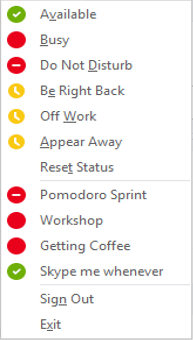
- Set your Skype for Business client in Do Not Disturb using a custom presence state called Pomodoro Sprint and set your personal note to when you will be available
- You can mute and unmute your phone during the Pomodoro Sprint using IFTTT triggers
- You need to have created the mute and unmute triggers, generated a webhook key and installed IFTTT on your mobile
- Will write a tutorial in a later blogpost
- It will make you available again after 25 minutes or your specified time, turning on notifications, making you available again in Skype for Business and unmute your phone. Awesome stuff :)
This is an open source project on GitHub so please feel free to add your own suggestions to the project.
How to get started
- Open PowerShell and run the following cmdlet
- Install-Module -Name PSProductivityTools
- if you need to update it later run Update-Module -Name PSProductivityTools and restart all PowerShell instances
- You need to run PowerShell as administrator in order to install the module
- Now you can run Start-Pomdoro at any time from PowerShell
- Start-Pomodoro
- This will set your computer in presentation mode
- Start-Pomodoro -Minutes 15 -EndPersonalNote “It’s a good day today”
What is the Pomodoro Technique?
 The goal of the technique is to reduce the impact of internal and external interruptions on focus and flow. A pomodoro is indivisible. When interrupted during a pomodoro, either the other activity must be recorded and postponed (inform – negotiate – schedule – call back) or the pomodoro must be abandoned. The technique uses a timer to break down work into intervals, traditionally 25 minutes in length, separated by short breaks. These intervals are named pomodoros. Read more about the Pomodoro Technique here
Why the Pomodoro Technique?
 If I can get one Pomodoro done in between meetings, workshops and calls, then I am happy. That Pomodoro is priceless and it helps me answer that long email, get started on that document or wrap my head around a problem. 25 minutes is long enough so that I can reach my flow state and short enough that I feel that I actually can do it. It may take between 5-10 minutes to reach the flow state. If I manage to interrupt myself with social media, coffee break or decide to do something else, then I may spend longer time in total on that email instead of just get it done during a Pomodoro. If you want to succeed with Pomodoro, you need to make yourself unavailable, but equally important, you need to make yourself available again when those 25 minutes have passed. That is why we created the Pomodoro PowerShell tool
What is flow?
Flow is the peak performance state where you feel your best and you perform your best. The good news is, it’s hackable. One of the hacks is inducing flow using the Pomodoro Technique. Read more about flow over at the Flow Genome Project
An important part of succeeding with the Pomodoro Technique is lists with your most important tasks that you can prioritize. I use OneNote for that. Check out how I do it in my OneNote LifeHacks YouTube series










 msunified.net
