Author: Ståle Hansen
My Lync and BYOD in a WIFI infrastructure LyncCast is now Online
Friday april 11th I did a talk over a Lync Cast arranged by Microsoft Norway about Lync and Bring Your Own Device (BYOD) in a wireless infrastructure in Norwegian.
Abstract: Bring Your Own Device (BYOD) er en trend IT avdelingen ikke alltid kan kontrollere. Tar man Lync med telefoni med i bildet så er det en del momenter man må tenke på, som hvilket nett skal «unmanaged devices» koble til, hvordan kan vi sikre tale kvaliteten og hvor enkelt er det å komme i gang for brukeren. Hvis du ønsker å lykkes med Lync i et trådløs nettverk, da er denne webcast for deg og din bedrift
View the video here:
Finding the correct patch version of a Lync server
 Recently I have been troubleshooting and doing health checks on a couple of Lync systems. When troubleshooting it is good to know what patch level your servers are on, whether they are on the same patch level or the newest patch level.
I discovered at one client that the Edge servers in DMZ was being patched through Windows Update, but the internal Front End servers where not being patched, they where not part of the patch system the customer where enforcing. The result was that at one point, with the january 2014 cumulative update on the Edge server and the RTM patch level on the Front End servers, the gap became too large and the it ended up with the Front End servers not supporting and working with the Edge AV relay server. We saw the error occur with unsupported realy server in the diagnostics header before the Front End servers even tried setting up the media traffic on the Edge servers. Quite a strange problem to troubleshoot, but best practice is that all servers should be on the same patch level. Patching the internal Lync servers solved the issue.
Here is some notes on finding what patch level your servers have
- To find the patch level of your Lync server, the easiest way is looking at the installed components under control panel and programs and features
- Check out this post on how to by fellow UC Architects podcaster MVP Tim Harrington: http://howdouc.blogspot.se/2012/04/three-ways-to-determine-what-version-of.html
- The cool way to do it is to use PowerShell script
- Check a scritp I developed for this: https://msunified.net/2014/05/05/script-to-find-current-cumulative-updates-on-lync-servers-in-a-deployment/
- Also check out a similar script developed by MVP Pat Richard: http://www.ehloworld.com/2641
- Do not use WMI quiries because it will get the MSI package to reconfigure itself: http://powershell.org/wp/forums/topic/alternatives-to-win32_product/
- I see there is a lot of blogposts using wmi quiries like these, do not use them.
- Get-WmiObject -query ‘select * from win32_product’ | where {$_.name -like “Microsoft Lync Server*”} | ft Name, Version -AutoSize
- You can also just output the core components using this oneliner
- Get-WmiObject -query ‘select * from win32_product’ | where {$_.name -like “Microsoft Lync Server*core components*”} |ft Name, Version -AutoSize
- A good way to check the patch number with what time it was deployed I check the list in this blogpost by Murat
- Since all servers should be at the same patch level, it is a good practice to check installed version on all of the servers with core components installed, including trusted servers
- To find what servers have core components installed, you can run this cmdlet
- Get-CsComputer | ft fqdn
- This will give you all involved servers, including gateways which you should ignore
- Remember, all servers with UCMA installed, like Exchange, should be patched for Lync as well
- When patching your servers it is a good thing to stop all Lync services first, patch the server and then restart the services
- Reboot is not required after this procedure
- For a more detailed description on how to patch your servers I find this blogpost to be most helpful by Charbel Hanna
- It is also a good practice to patch the clients the same time you patch the servers, since each, client and server, may be part of a solution to a problem
- If you to have strange errors like not being able to forward calls, check for pending windows updates, install them and reboot the server
- Had this issue once, described here: https://msunified.net/2013/01/09/cannot-complete-the-transfer-in-lync-server-2013/
Awarded Microsoft Most Valuable Professional (MVP) 2014
Today I received the Microsoft MVP Award for my contributions in the Lync Community. This is the fourth time I have received this award, the first time was in 2011. This is huge and it is really inspiring to get recognition for my contributions. Here’s an excerpt from the email I got:

Congratulations! We are pleased to present you with the 2014 Microsoft® MVP Award! This award is given to exceptional technical community leaders who actively share their high quality, real world expertise with others. We appreciate your outstanding contributions in Lync technical communities during the past year.
I feel very honored to be part of this outstanding community and I want to mention the MVP Summit as a highlight of the experience. With all the cool things happening around Lync, Office 365 and Windows 8 I look forward to contribute to the community the coming year as well.
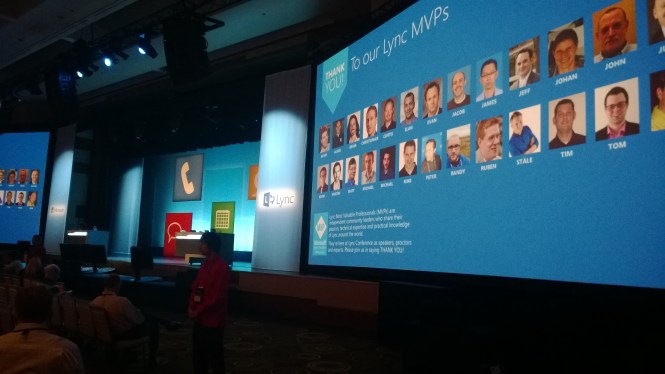
Microsoft takes good care of their MVP’s and we where featured at the keynote at LyncConf :)
Resources
About the MVP Award Program
Lync MVP Awardees
MVPs.org community site
Microsoft MVP FAQ
Speaking at TechEd North America 2014
I am proud to announce that I am speaking at TechEd North America 2014 in Houston! This is the second international talk I am doing this year and my previous talk was in Las Vegas at the Lync Conference 2014. Apparently the session I did on the Lync Conference had the correct content and I am excited to be giving the same talk at TechEd. The topic was Phone Number Management in Lync Server 2013.

Title: Phone Number Management in Microsoft Lync Server 2013
Level: 400
Url: http://tena2014.eventpoint.com/Speaker/Details/207466a5-469f-e311-b30e-00155d5066d7
Session Code: OFC-B416
Time Slot: Wednesday May 14, 8:30 AM – 9:45 AM
Room: 350D
Abstract: Ståle Hansen, the creator of Get-UnusedNumbers PowerShell script, walks through how phone number management is done throughout different Lync deployments. The session will start with some of the basics and will quickly move over to more advanced scripting and tools that can be utilized in user creation workflows and user management scenarios. Be sure to attend this session if you want tips on phone number management in your environment or customer deployments.
Improvements
I will try to work with the talk and do more demo’s around third party offerings and also evolve the script with the input I got during LyncConf so stay tuned for that.
You see only a white screen when viewing Lync 2013 desktop sharing
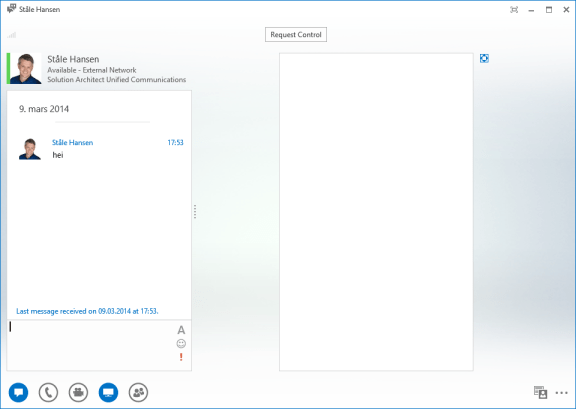
On a couple of Windows 8 computers I have seen the issue where I receive only white screen when someone shares their desktop with me in Lync 2013.
This applies to
- Fresh installed Windows 8 computer
- One year old Windows 8 computer
- Lync Peer to Peer collaboration
- The issue is consequent so it is not a specific deployment issue
- Lync conference
- All other attendees can see the screen fine so it is not an appsharing issue
- The issue is client related so it will be present for Lync Online as well as Lync on-premises
The experience
Some notes from #LyncConf14

Launching Lyncnumbers.net
 I have teamed up with Lync Professional Lasse Nordvik Wedø in order to help administrators all over the world get a solid grip on their numbering plans within a Lync deployment.
We have separately developed scripts and techniques to cope with ours (and our customers’) numbering plans in Lync deployments with Enterprise Voice Enabled.
Attacking the challenges from two different perspectives, we realized our scripts and thoughts were complementing each other.
To help others, we have decided to launch a dedicated site to the subject, called “Lyncnumbers.net”. Under this umbrella we will keep updating the scripts (posted on the Technet Gallery), sharing tips on how to use them, explaining the different parameters in use and other tips and techniques we come along in our deployments.
At launch, there will be three scripts in the “toolbox”: Get-UnusedNumbers, Get-assignedlineuri and Search-LineURI. But who knows what we will end up with.
I will demo these scripts on my level 400 talk at Lync Conference 2014 in Las Vegas. Check out and sign up for my session: http://www.lyncconf.com/SessionDetail.aspx?id=9438
From here on, I will only post brief updates about these scripts on this blog, but post in-depth and practical information over at lyncnumbers.net
So head on over to the new site, to get a grip on the possibilities and give feedback
Slides from my NICconf 2014 talks are online
 This year I had the honour to talk at the Nordic Infrastructure Conference (NIC) 2014 in Oslo, Norway. This is a great conference getting more traction in the market with A list speakers like John Craddock, Johan Arwidmark and Wally Mead. MVP Justin Morris and I had two Lync talks each. Below you can download my slides and read the key takeaways from my sessions. Sadly there where no recording this year, hope they will have the capaticy to record sessions next year. Continue reading
Dial-in Conferencing in Lync now just requires Enterpreise CAL
Some time ago the CAL licensing for dial-in conferencing was changed. The change is that for users to be able to invite to a Lync meeting where users are able to dial in from a phone or a mobile now just require that this user has an enterprise CAL. Earlier the users that could invite to such meetings needed to have plus CAL in order to do this. The scenario is that users now can invite to a phone conference without being enabled for Enterprise Voice which requires Plus CAL. This is ofcourse policy controlled on the Lync server and has always been possible, but not from a licensing perspective.
Figure 1: Dial-in Conferencing in Lync
|
Feature |
New or Improved |
Standard CAL |
Enterprise CAL |
Plus CAL |
| Initiate an impromptu (ad-hoc) multiparty (3+ users) meeting with audio and video (including dial-out to PSTN or PBX users) | Improved |
● |
||
| Initiate an impromptu (ad-hoc) multiparty (3+ users) meeting with audio (including dial-out to PSTN or PBX users) | Improved |
● |
||
| Schedule and invite attendees to meetings with audio (including dial-out to PSTN or PBX users and hosted audio conferencing features), video, web conferencing and content sharing | Improved |
● |
||
| Automatically join meeting audio from PBX or other phone number | Improved |
● |
||
| Enable use of Lync Room Systems | New |
● |
 msunified.net