Lync 2013 Basic with gallery view and recording

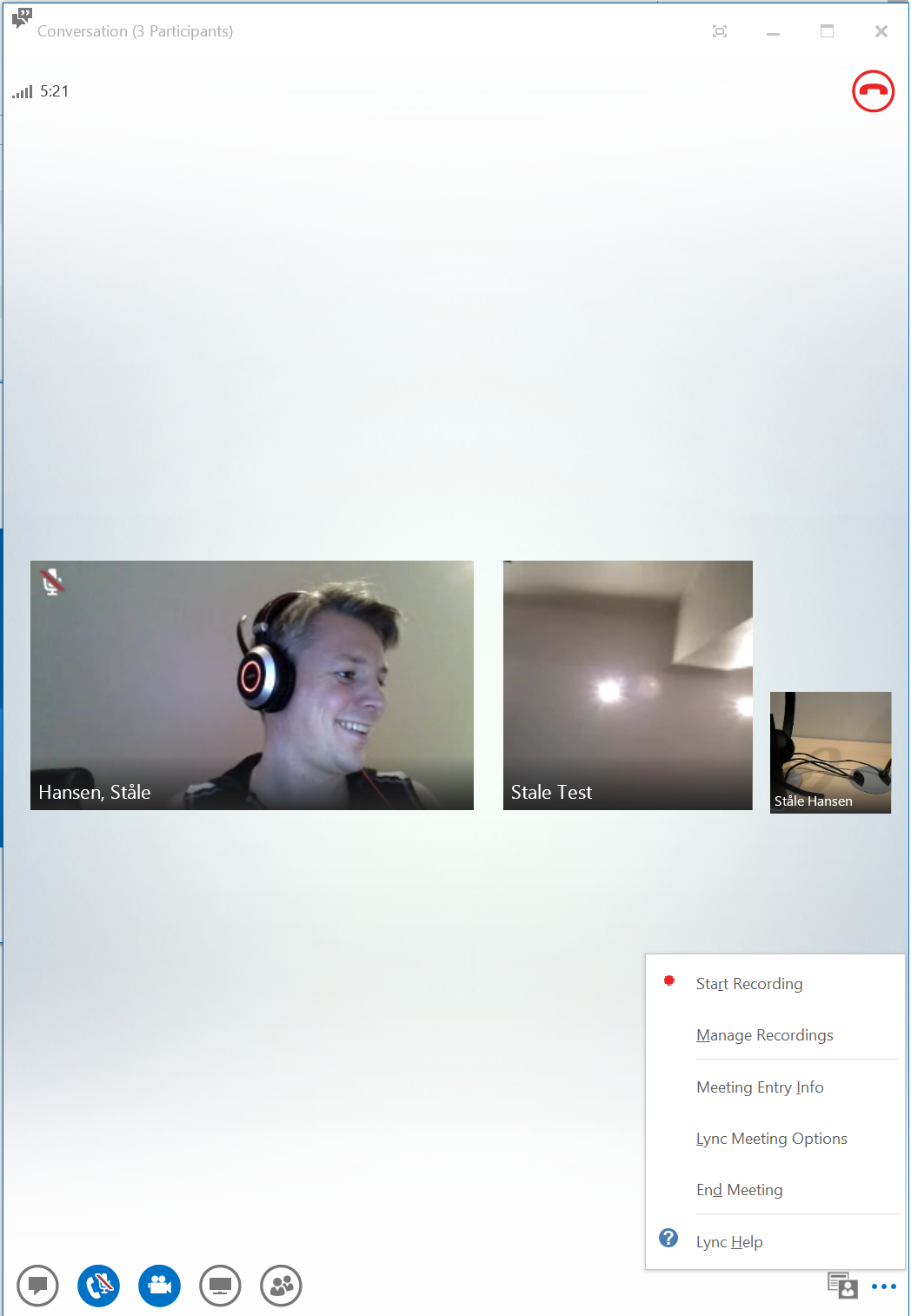
The Lync 2013 Basic client just got epic with the October 2014 update it can do gallery view and recording. These where major features for not running the Basic client in production.
Basic

Gallery view and recording

If you are using advanced Enterprise Voice features like Response Groups, Manage Delegates, Call Pickup or Call Park then you need the full rich client that is part of Office 2013 Pro plus.

  • If you deploy Lync from Lync Online from the Business SKU you wont get the Lync client because it includes Office 2013 Business.
  • Basic is now feature rich enough to be a valid client for those types of users, since Lync Online does not have Enterprise Voice features.
  • This also applies to those customers that have an Open License of the Office suite and needs to roll out Lync
    • You can not combine Lync click to run provided by Office 365 with locally installed office from media
  • This means you can easily combine Office 2010, if you for some reason need it, with a Lync 2013 client without needing the Office 2013 License

Lync 2013 Basic features

Taking a closer look at the Client comparison tables for Lync 2013 clients is seems like it is quite outdated.

Notable features the Lync Basic client now can do is

  • Click to call (not new)
  • Transfer Calls (not new)
  • Manage call forwarding
  • Client-side recording of audio, video, application sharing, desktop sharing, and uploaded content
    • In conferences, tested ok
    • Could not verify in peer to peer call
  • Select preferred recording resolution
  • Users can use the gallery view to see all users’ video instead of only the active speaker’s in a video conversation that has more than two people.
  • Users can switch mode between gallery and speaker.
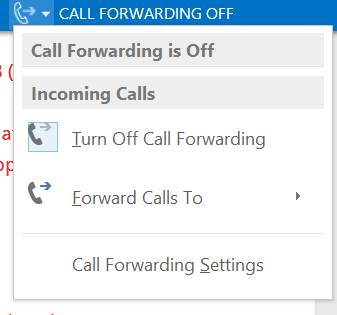
Call Forwarding setings

Call Forwarding setings

Download the clients

Remember to apply the October update
Microsoft Lync Basic 2013 (64 Bit)
Microsoft Lync Basic 2013 (32 Bit)

 

Thoughts on UC: Productivity

As an Information Worker I am passionate about productivity and finding techniques, equipment and devices that may make me more productive.

In this YouTube video I touch upon productivity from a personal perspective and business perspective

About Thoughts on UC YouTube series

I want to share mye ideas on what I  considers to be the defining elements to a successful UC rollout.The goal is to get people thinking by hightlighting important topics in and around UC deployment and adoption phases.

References

“Productivity, Chance Favors the Connected Mind”
-Steven Johnson

State of Unified Communications 2014

Is that time of the year again when Gartner releases their yearly analysis of the Unified Communications vendors and their offerings called Magic Quadrant for Unified Communications. The vendors evaluated must meet certain criteria which is a product portfolio that supports

  • Voice and telephony
  • Conferencing
  • Messaging
  • Presence and IM
  • Support for different client platforms
  • Support communications-enabled Applications

It is a tradition to comment on the Gartner UC MQ’s here at the msunified.net blog, and have done so since 2009. See the previous articles here:

Speaking at TechEd Europe 2014

I am proud to announce that I am speaking at TechEd Europe 2014 in Barcelona! This is the third international talk I am doing this year and my previous talks where in Las Vegas at the Lync Conference 2014 and in Houston at TechEd North America.

This time I am talking about a very interesting topic around how to succeed with mobile devices and enterprise voice. As more and more organizations move to Lync and voice and adopting BYOD and mobile devices call quality may get a hit. I will talk about what you need to focus on and how to actually implement it. See you in one of Europe’s finest cities :)

teeu


Title:
Five Best Practices to Consider When Deploying Microsoft Lync 2013 for Mobile Clients with Enterprise Voice
Level: 300
Url (public): http://teeu2014.eventpoint.com/topic/list?keyword=hansen
Url (login): http://teeu2014.eventpoint.com/topic/details/OFC-B344
Session Code: OFC-B344
Time Slot: Thursday, October 30. 5:00 PM-6:15 PM
Room: Hall 8.0 Room F7
Abstract: When deploying Lync Mobile with Enterprise Voice, users expect to be able to complete calls as expected, roam around the building as they do when using cellular roaming, and have pristine quality to their calls as they do from their wired computer. Anything below those expectations would be a letdown, a failure, and Lync is always to blame, right? This session touches upon five best practices to consider when you want to reach those expectations and have a successful Enterprise Voice rollout with mobile Lync users in mind.

HashTags: #Lync #LyncMobile #BYOD #Productivity #GenMobile #GoodTimes #QoS #SDN

Session from TechEd North America 2014 is online

Recently I had the honor to speak at TechEd North America in Houston. I had a blast doing the session and I really want to thank those who attended my session. Some of the comments I got after the session makes it apparent that managing Phone numbers in Lync is becoming a challenge lots of organizations need to have a strategy for. Continue reading

Script to find current Cumulative Updates on Lync servers in a deployment

adhesive_bandage-512Recently I posted a blogpost on Finding the correct patch version of a Lync server. After writing the blogpost I realized that it would be very cool to automate this using PowerShell. The result is Get-CsInstalledLyncVersion.ps1 which is available to TechNet Gallery. This is a great tool to do an initial assesment of a Lync deployment where you get a good overview of installed servers and their current patch level.

Get-InstalledLyncVersion.ps1 script to check patch level on all Lync servers in an environment

  • .Notes
    • This script works for Lync Server 2010 and Lync Server 2013
    • Run Lync Management Shell in Administrative mode
    • Use the Function Get-RemoteProgram by Jaap Brasser, modified by MVP Jan Egil Ring
    • If you can not connect to a server make sure Remote Registry Service is running on the machine you are unable to reach
      • Port 139 and 445 needs to be open on the server you are trying to scan
    • Tested OK in 2010 and 2013 environments
    • The script will be updated as new CU’s will arrive, but will also flag unknown CU versions and let you download the latest one
  •  V1.0 May 2014 – Initial Script
    • Scans registry on all servers in a Lync deployment to find current installed version
    • You shall not use WMI to query MSI packets as that will invoke a reconfiguraton
    • Checks against a database in this script to find the correct CU level
    • Will ask if you want to download the current CU if there are servers which is not on the latest patch level
      • Using function New-FileDownload by MVP Pat Richard
      • Will open the download location after the file is downloaded
    • No Parameters are required

Download the script here

Pat Richard beat me to it and released a similar script days before I completed mine. Check it out at http://www.ehloworld.com/2641

Screenshots:

Output of scanned computers in a 2010 environment

Get-InstalledLyncVersionV1

Output of CU download dialogue in 2013 environment

Get-InstalledLyncVersionV2

#LyncConf14 Sessions available on Channel9

Proud to have my content on Channel9 which is where Microsoft put their media content from conferences and jumpstarts. You can watch my session from the Lync Conference 2014, both the original one and the repeated session I did at the conference.

My Level 400 session on Lync Phone Number Management in Lync Server 2013

  • I had a great time talking phone number management in Lync
  • I took part in launching lyncnumbers.net to collect phone number management tips and scripts in preparation for the talk
  • Got some great feedback from my talk and it is available to attendees for download today
  • I really recommend watching all the level 400 sessions, the product has been around for over a year and it shows in the depth of these highly technical sessions
  • Thanks to all who attended my talk!

View the talk here

Channel9