Awarded Microsoft Most Valuable Professional (MVP) 2015

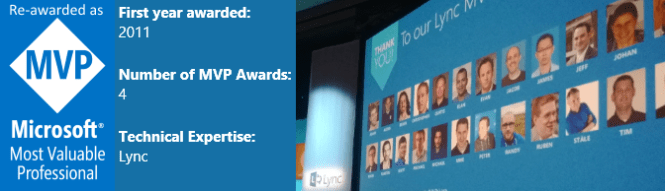
I am really proud to be awarded Microsoft Most Valuable Professional (MVP) 2015. This is the fifth time I receive this award and it is a real honor to be part of this community and that Microsoft recognizes my contributions. This time I a have been awarded as Skype for Business MVP. Being an MVP helps me stay current on the technology, have a great network to sync my ideas with and learn directly from Microsoft at the MVP Summit. Next up is that I am speaking at Microsoft Ignite, reach out to me to chat about #Skype4B :)

Here is a photo of me and MVP Tom Arbuthnot at the 2014 MVP Summit

IE5A5668

At the 2014 MVP Summit. Here is some highlights of my community contributions last year: https://msunified.net/2015/01/04/what-a-year-2014-was/

Resources

About the MVP program: https://mvp.microsoft.com/en-us/overview.aspx
The MVP FAQ: https://mvp.microsoft.com/en-us/faq.aspx
Skype for Business MVP’s: https://mvp.microsoft.com/en-US/search-mvp.aspx?ex=Skype+for+Business&sc=s
Got Office installed from Office 365 and want to test Skype for Business Client Preview?

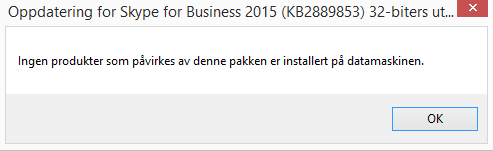
If you are like me and have installed Office 2013 from Office 365 you will get this message when you try to install the Skype for Business Client Preview. noversionmatch
The message states (in Norwegian for me) that no version that matches this package is installed on the computer. Why is that you say? Well it is because you can not combine a Click-to-Run Office with an MSI packaged Office that the Skype for Business Client Preview is.

How to resolve this

  1. You need to install a MSI based Office package on your computer
  2. If you don’t have access to the Office 2013 ISO file from a license site you can actually download and install the Office 2013 trial client
  3. Important: Do not customize the installation like removing features such as Access and Publisher because you will not be able to use you Office 365 credentials to validate the product.
    • This is because the one you get from Office 365 is a non-customizable install and so must the MSI installation be as well
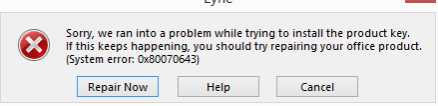
    • If you customize the installation the activation will fail with this message
    • fail
  4. After installing the MSI based Office 2013 you can activate the product with your Office 365 credentials
  5. A couple of reboots are required to get this process right
  6. Now you are ready to install the Skype for Business Client Preview and use you MSI based Office
  7. Take note that the biggest difference between MSI Office and Click-to-Run Office is that MSI Office is updated using Windows Update where the other version is updated through Office 365

Is using Office 365 credentials to activate an MSI based Office 2013 within the licensing rights? I guess so since you are able to activate, but I am not sure so please consult your favourite licensing advisor

Speaking at Microsoft Ignite in Chicago

I am proud to announce that I am speaking at Microsoft Ignite 2015 in Chicago! I am talking about  often neglected, but very important topic, which is how operations should handle phone numbers in Skype for Business. You can find most of the tips, scripts and tools talked about in this session at http://skypenumbers.net Continue reading

What a year 2014 was!

2014 was a really great year for me. I got to talk at 6 international conferences, start a new branch of Knowledge Factory in Norway and reach over 1 000 000 views on my blog. Thank you all for the opportunities and support. Some memorable moments are listed below with links to my talks. Hopefully something fun will happen in 2015 as well.

01Nicconf2014

02Lyncconf2014

03UCALiveLyncconf2014.3

04KnowledgeFactory2014

05MVPreawarded

06TechEdNA2014

07LyncDay14

08UCALiveLynDay2014

09TechEdEU2014

10TechDays2014

11YouTube2014

11msunified2014


Five years of blogging and 1,000,000 hits!

ThankYou!First off, thanks to all who have visited msunified.net and given feedback to the blogposts. I am stoked that my blog msunified.net now has more than 1,000,000 hits. Since I started blogging in 2009 it has been the place where I post my notes from the field, collections of links and Thoughts on UC.

Some of the most popular blogposts of all time

  1. Installing Exchange 2010 Prerequisites on Server 2008 R2
  2. Enabling Lync Server 2010 for Lync Mobile Clients
  3. Installing Lync Server 2010 Prerequisites on Windows Server 2008 R2
  4. Configure Exchange 2010 InternalUrl PowerShell script
  5. Lync Server 2010 features and how to configure them
  6. Lync Server Mobility Troubleshooting Tips
  7. Lync Server 2010 Troubleshooting Tips
  8. Installing OCS 2007 R2 Prerequisites on Windows Server 2008 R2
  9. Script for Configuring Exchange 2010 Internal and External URLs
  10. Lync Server Front End: Lost connection to the Web Conferencing Edge Server
  11. Lync client sign-in and DNS records recommendations

Some of the most popular blogposts the year of 2014

  1. Installing Exchange 2010 Prerequisites on Server 2008 R2
  2. Lync client sign-in and DNS records recommendations
  3. Enabling Lync Server 2010 for Lync Mobile Clients
  4. Lync 2013 Downloads
  5. Configure Exchange 2010 InternalUrl PowerShell script
  6. Lync Server Mobility Troubleshooting Tips
  7. Troubleshooting Office Web Apps Server for Lync
  8. You see only a white screen when viewing Lync 2013 desktop sharing
  9. Installing Lync Server 2010 Prerequisites on Windows Server 2008 R2
  10. TEL, SIP, mailto, and Lync meeting links association

Where do the all time visitors come from

  1. Search engines
  2. TechNet Forums
  3. Twitter

Some thoughts on the activity

  • People are still installing Exchange on Server 2008 R2 :)
  • The old blogposts from 2010 are still relevant
  • Twitter is a relevant platform to reach out to my audience as it is number three all time source for visitors
  • The type of article that drives recurring hits are
    • the ones that solves a specific problem
    • troubleshooting guides
    • link repositories
    • articles explaining how stuff works
  • I also use this blog as a landing page for all my content, but articles like this one will not drive much recurring users, but helps me communicate my thoughts in a better format than the 140 characters on Twitter :)
  • I always try to remember to blog solutions I find to strange problems, typically the solution was tips from multiple sources and by collecting them and describing how I solved the problem is a good blogpost, and will help others having the same problem.

Afterthought

The amount of hits really motivates me to continue share my experiences as an IT-PRO with solutions to problems, but also highlighting not so mainstream knowledge like I do in my LyncPro Tips series and Thoughts on UC YouTube series. Thank you for your continued support :)

OneMillHits1

On December 23 2014 msunified.net reached 1,000,000 views!

Lync HA/DR Deep Dive Class in Norway

January 19-22 I am running a 4 day Lync High Availability and Disaster Recovery Deep Dive class in Oslo, Norway. The focus of the class is to get a deep understanding of the concepts and features of how a highly available Lync deployment works. I am running the class together with my colleague at Knowledge Factory, Morten Enger, to ensure that the hands on labs run smoothly and that the content have hight quality.

SLA

Here is an overview of the content we are focusing on. Each day starts with a deep dive in to how stuff works and then the rest of they day will be spent in the custom made lab setup.

  • Day 1 – SLA, Disaster recovery and high availability concepts deep dive and initial lab setup
  • Day 2 – Configure and experience the effects of Disaster Recovery hands-on labs
  • Day 3 – Configure High Availability using KEMP load balancers, SQL Server mirroring and redundant SIP Trunks hands-on labs
  • Day 4 – Experience the effects of High Availability during production and maintenance hands-on labs

The goal of the class is that attendees will experience how failover and disaster scenarios behave on server level and for end-users. After completing this class the students will be able to tune their own environment and decide how to best implement DR or HA for Lync environments.

All the content will be created in english and if we have english speaking students, the class will be delivered in english.

Sounds interesting? Sign up at Global Knowledge http://www.globalknowledge.no/kurs/microsoft/voice/gklyncic.html


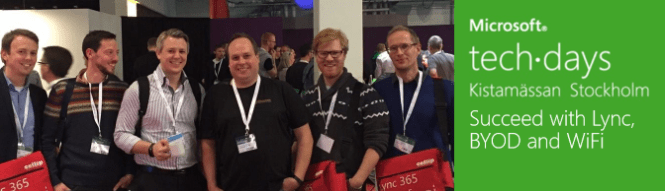
Succeed with Lync, BYOD and WiFi

This fall I had the honour of talking at TechEd Barcelona and TechDays Sweden about how to Succeed with Lync, BYOD and WiFi. This is a topic I am quite passionate about since it affects end-user experience. I believe that this is THE key focus areas for a successful Lync deployment. There is a saying that we as consultant, technicians and System Integrators always succeed with implementing the technology, but that does not mean the business are succeeding. Continue reading